How to Export Database Table via phpMyAdmin in cPanel

1. Log in to your cPanel account.

2. In the Databases section, click on phpMyAdmin.


3. From the navigation tree in the left sidebar. Please select an appropriate database that you want to export to your computer
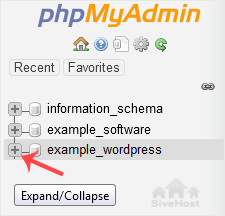


4. Click on Export.



5. Select SQL format and then click Export.


SQL file will be downloaded within a few seconds, depending on the size of the file.

  • 0 Basebedisi ba Fumane Sena se na le Molemo
Na karabo ena e ile ya thusa?

Dihlooho tse Amanang

How to Create a Database in cPanel

1. Log in to your cPanel account.2. In the Databases section, click on MySQL Databases. 3. In the...

How to Rename a Database in cPanel

1. Log in to your cPanel account. 2. In the Databases section, click on MySQL Databases. 3....

How to Delete a Database in cPanel

1. Log in to your cPanel account. 2. In the Databases section, click on MySQL Databases. 3....

How to Add a User to a Database and Grant Privileges

1. Log in to your cPanel account. 2. In the Databases section, click on MySQL Databases. 3....

How to Optimize a Database via phpMyAdmin in cPanel

1. Log in to your cPanel account.2. In the Databases section, click on phpMyAdmin. 3. Click on...